Nothing is worse that getting a Slack huddle request while you’re already mid-sentence in a Teams meeting
Hi everyone! Welcome to my first post. In this post, I will talk about a tool that can help you to sync Slack and Teams without messing around with Slack’s app settings. This means you don’t need to wait for admin approval to change your own status.
This solution was created because I couldn’t use a Slack app to sync my status, my company has already consumed the entire quota for apps. So, I decided to write this post.
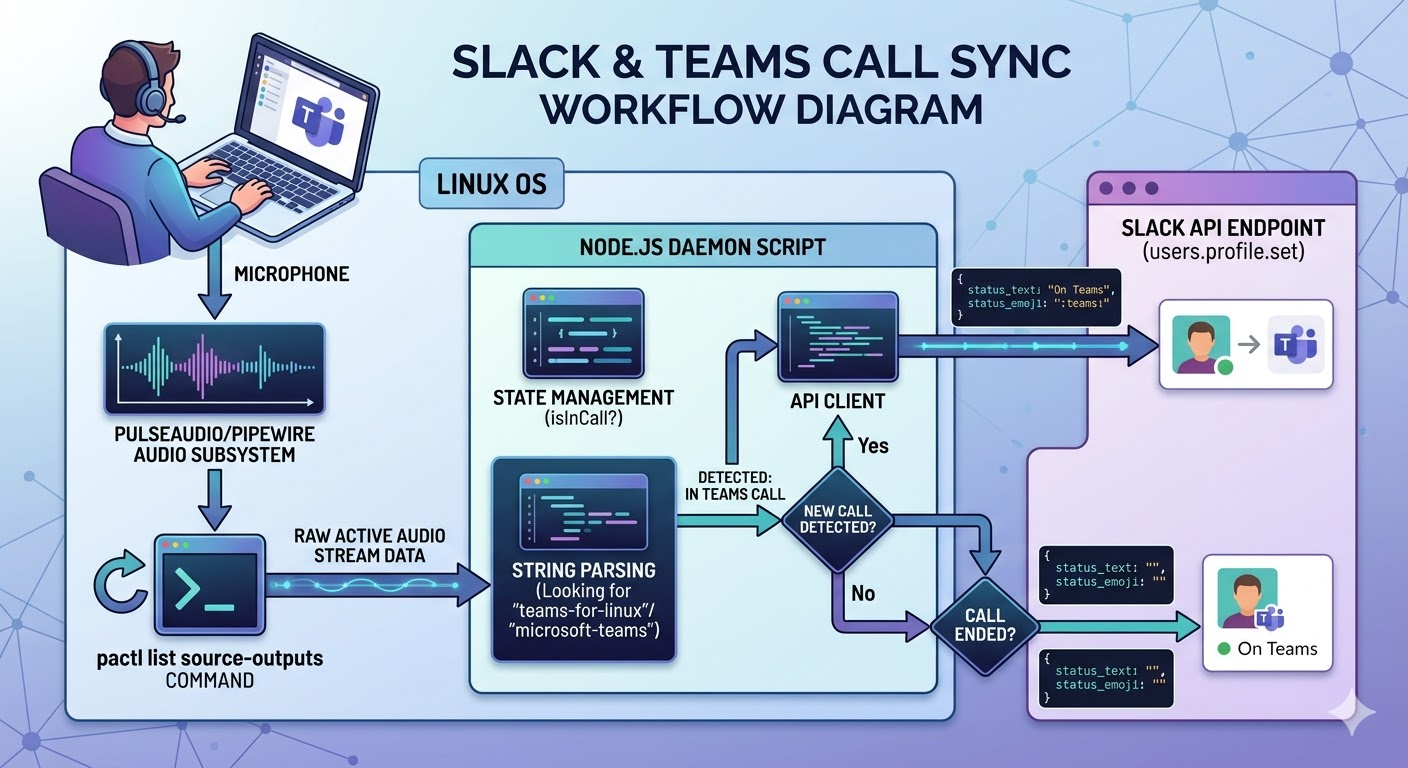
The idea is simple: first, the tool scans all applications currently using the microphone. If it detects the word “teams_for_linux”, it updates the user’s Slack status to “On Teams”.
Another big challenge was (and still is) extracting the auth token and cookie from Slack to call the API and change the user’s status.
Before all
As of now, you must manually collect that data from your browser. Essentially, you will need to perform an action in the browser and manually copy the credentials from the Network tab.
- Open the browser’s inspector
- Change your Slack status
- Find the
users.profile.setrequest - Extract the token from the “Payload” tab, it should start with
xoxc-... - Extract the cookie from the headers, it should start with
d=xoxd-...
Save this information in: ~/.config/sync-slack-teams/config.json
{
  "token": "xoxc-...",
  "cookie": "xoxd-...",
  "host": "https://YOUR_CUSTOM.slack.com"
}
Warning: These credentials grant full access to your Slack account.
Implementation
Let’s get hands-on! I have tested this application on Ubuntu desktop (Pop!_Os 24.04), so it should also work for other Linux distros.
- List of applications using our microphone:
// Using Node's child_process to peek at PulseAudio
const { execSync } = require('child_process');
const audioStreams = execSync('pactl list source-outputs').toString();- Filter for applications named “Microsoft Teams”:
const isInCall = audioStreams.toLowerCase().includes('Microsoft Teams');With this complete, our tool can detect if we are in a call in a Teams call.
The remainig part is pretty simple: we need to call the Slack API passing our credentials to update the status
- Call Slack API
// Axios or fetch :)
const response = await axios.post(`https://MY_COMPANY.slack.com/api/users.profile.set`,
    {{ status_text: "On Teams", status_emoji: ":teams:", status_expiration: 0 }},
    {
      headers: {
        'Authorization': SLACK_TOKEN, // Your Token: xoxc-...
        'Cookie': SLACK_COOKIE, // Your Cookie: xoxd-...
        'Content-Type': 'application/json; charset=utf-8'
      }
    }
  );
Finally, once we finish the call, we can remove our Slack status so everyone knows we’re free, by making another Slack API call:
const response = await axios.post(`https://MY_COMPANY.slack.com/api/users.profile.set`,
    {{ status_text: "", status_emoji: "", status_expiration: 0 }},
    {
      headers: {
        'Authorization': SLACK_TOKEN, // Your Token: xoxc-...
        'Cookie': SLACK_COOKIE, // Your Cookie: xoxd-...
        'Content-Type': 'application/json; charset=utf-8'
      }
    }
  );
I’ve created a repo where I’ve configured the tool as a daemon that runs 24/7, but it has a limitation; it depends of where you are using your Teams. For now, I have only tested it on “Teams for Linux”, well you can find it here: